📝 Overview
This article explains how an administrator can reset a user's password in Odoo ERP (Smart ERP). It ensures secure access recovery using the built-in password reset feature.
🎯 Purpose
To help administrators assist users who cannot log in by sending a secure password reset link.
⚙️ Step-by-Step Instructions
🔹 Step 1: Open User Settings
Go to:
Settings → Users & Companies → Users
🔹 Step 2: Find the User
- Search for the employee or user
- Open their profile
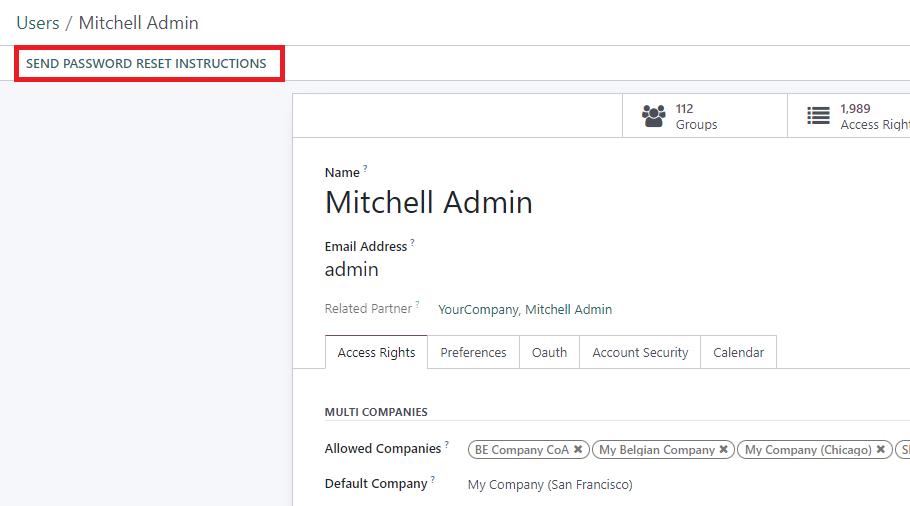
🔹 Step 3: Send Reset Instructions
- Click Action
- Select Send Password Reset Instructions
📩 An email will be sent to the user automatically.
🔹 Step 4: User Opens Email
- User checks their inbox
- Clicks the reset link
🔹 Step 5: Create New Password
- Enter new password
- Confirm password
- Click Save
✅ User can now log in successfully
⚠️ Important Notes
- 🔐 Only Administrators can reset passwords
- 📧 User must have a valid email address
-
📬 If email not received:
- Check spam/junk folder
- Verify mail server configuration
- 👤 Archived users must be activated first
- 🚫 Never share passwords manually
🔄 Troubleshooting
| Issue | Solution |
|---|---|
| No reset email | Check email & mail server |
| User inactive | Activate user |
| Link expired | Send again |
| Wrong email | Update user email |
✅ Best Practice
Always use the official Odoo reset email system to maintain security and audit tracking.
📌 Related Articles
- User Access Management
- Creating New Users
- Mail Server Configuration
🧪 Demo Tip
You can test this by:
- Creating a demo user
- Assigning your email
- Triggering reset